Magnetic Stripe Cards
Magnetic Stripe Cards
HiCo and LoCo stripe cards for POS logins, hotel keys, gift cards and time clocks. If you have the encoding, we can print the card.
Request a quote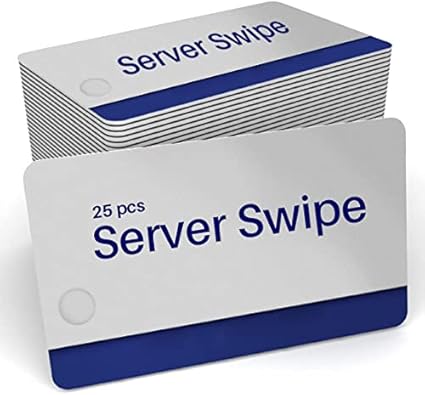
Magnetic stripe cards are still everywhere a simple, cheap swipe does the job: point of sale logins, hotel room keys, time clocks, gift and loyalty programs, library and membership cards. The stripe itself is just a strip of magnetic material that holds a few lines of data. What makes a card work is that the stripe, and the data on it, match the system that reads it. This page covers the one specification that trips people up, what we keep in stock, and how custom runs work. For how magnetic stripe sits alongside prox, NFC and smart cards, see our guide to access credentials and encoding.
HiCo or LoCo: the choice that matters
Magnetic stripes come in two strengths, measured in a unit called the oersted (Oe). The number describes how hard the stripe is to write, and so how hard it is to wipe by accident. Our glossary entry on coercivity has the detail.
- HiCo, or high coercivity, is usually 2750 Oe. It takes a strong magnetic field to change, so it survives wallets, phone cases and daily handling. Outside hotels, it is almost always the right answer: POS employee cards, gift and loyalty cards, access cards and anything swiped many times a day should be HiCo.
- LoCo, or low coercivity, is around 300 Oe. It is easier and cheaper to write, which is why it suits cards that are rewritten often or only need to last a short while. Hotel room keys are the big example: hotel encoders almost always write LoCo, and HiCo keys generally will not work in them.
The rule that saves the most trouble: match the card to the encoder. Most HiCo encoders can write LoCo cards as well, but a LoCo-only encoder will not reliably write a HiCo card. HiCo stripes are usually black and LoCo stripes are often brown, but color is a habit, not a guarantee, so check the specification rather than the shade. The HiCo and LoCo glossary entry covers the difference in one page.
Tracks, and who decides what goes on them
A standard stripe has three tracks. Track 1 holds letters and numbers, track 2 holds numbers only, and track 3 is rarely used. Which tracks a card uses, and how the data is laid out, is decided by the system that reads it, not by the card.
That is why we put it simply: if you have the encoding, we can print the card. Send us the data for each card, laid out the way your system reads it, and we print the cards and encode the stripes. We do not design encoding schemes for a system, and we cannot tell you what a third-party system expects if its maker has not told you. Your POS provider, lock vendor or software supplier is the source for that, and once you have it, the cards are straightforward.
If you encode cards yourself, a card printer with a magnetic encoding module writes the stripe in the same pass as it prints the card. Our guide to choosing an ID card printer covers when the encoder is worth adding.
POS employee, server and manager cards
Restaurants and bars use swipe cards so staff can log in to the register and managers can approve voids and discounts without typing a code where others can see it. These cards get lost, bent and handed in when staff leave, so they are a steady reorder.
We stock MICROS cards for Oracle MICROS systems: server swipe cards in packs of 100, server and employee cards in packs of 25, and orange manager cards in packs of 25. All three are HiCo, and they are made for MICROS and Oracle systems only. They will not work on other POS systems.
For other point of sale systems, we print to the system's own specification, again provided you have the encoding. We also print for POS resellers and for the service companies that support national restaurant brands, in volume, and we can ship finished cards to each location instead of to one office.
Hotel keys, gift cards and the rest
The same stripe turns up in many other places, and the same HiCo or LoCo question applies to each.
- Hotel room keys. The front desk encoder writes each key at check-in, and it almost always expects LoCo. See our page on hotel key cards for stock keys and custom runs.
- Gift and loyalty cards. These are almost always HiCo. Many POS systems accept a swiped card number, but whether yours accepts cards printed outside its own program is a question for your POS provider before you order.
- Time clocks, libraries and memberships. Older systems often read a stripe, and replacement cards have to match the original format.
- Combined cards. A stripe can sit on the same card as a contactless chip. Our NFC cards page covers the chip side, and our SLE4442 contact chip cards carry a HiCo stripe as well.
Custom-printed runs
When you need cards printed with your design, custom runs start at 500 cards. The cards can be printed on both sides, with the stripe on the back in the standard position, and can add sequential numbering, a signature panel or a barcode.
You supply the finished artwork and the data for each stripe, and we print the cards and encode them. Lead times depend on the quantity and finish, so we confirm them on the quote rather than promise a number here. Our custom plastic cards page walks through how a run is ordered, and our post on how magnetic stripe cards work covers the technology in more depth.
For smaller quantities, or cards that each carry a different name and photo, it usually makes more sense to print blank stripe cards in house, or to have us do it through our ID card printing service.
Why a stripe stops working
A stripe that worked last week and does not today has usually been wiped or worn, not broken.
- It met a magnet. LoCo stripes are the usual victims. Magnetic phone cases, bag clasps and some speakers are enough.
- It is worn. Heavy daily swiping wears the stripe and the reader head together. HiCo cards on a clean reader last far longer.
- It was written for the wrong system. A card encoded in one format will not read in a system that expects another, even though both swipe the same way.
A wiped card can usually be encoded again. A worn or scratched stripe needs a new card.
FAQ
Magnetic stripe questions, answered.
Should I order HiCo or LoCo cards?
Can a magnetic stripe be added to a card I already have?
Will your MICROS cards work with my POS system?
What do you need from us to print stripe cards for our system?
What is the minimum for custom-printed magnetic stripe cards?
Why did a card that worked last week stop working?
Have the encoding? We can print the card.
Send us the stripe data, your artwork and the quantity, and we will quote the run.